
How to Claim & Apply Your World Association Grant
Jul 06, 2026
📋 Step-by-Step Grant Application Guide
Follow this step-by-step guide to apply your Regional Association Grant Code and begin your journey toward the Black Belt.
Step 1: Retrieve Your Private Grant Code
-
Check the email inbox you used during registration.
-
Open the email with the subject: "Welcome to Gongkwon Yusul Academy: Your Regional Development Grant Details Inside 🎁"
-
Copy your private Association Grant Code provided in the message.
(Note: To prevent unauthorized distribution and preserve grant integrity, codes are strictly shared via confidential email.)
Step 2: Access the 'Academy Store' & Select Your Program
-
Navigate to the 'Shop' or 'Academy' menu on our official portal.
-
Select the 1st Dan Mastery Black Belt Course Bundle (or your designated unit/plan).
-
Click "Enroll Now" or "Begin Journey" to proceed to the secure enrollment page.
Step 3: Apply Your Regional Association Grant
-
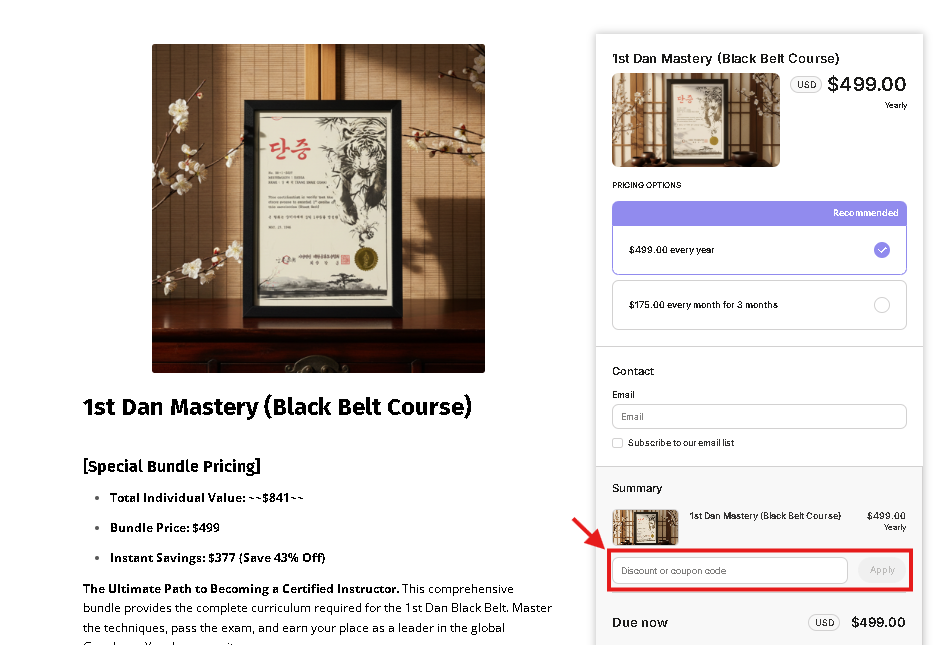
On the secure checkout page, locate the Order Summary section on the right.
-
Click on "Discount or coupon code"
-
Enter or paste your private Grant Code exactly as received in your email.
-
Click "Apply" to activate your Association-funded subsidy.
Step 4: Verify Your Subsidized Investment & Complete Enrollment
-
Confirm that your World Association Grant has been applied to reduce your tuition total.
-
Select your preferred payment method (Credit Card or PayPal) and finalize your enrollment.
-
You will receive instant, unlimited access to the digital mats!
⚠️ Official Terms & Global Integrity Rules
-
Strict Regional Compliance: Attempting to share, transfer, or use grant codes outside authorized regions constitutes a violation of association ethics and will result in immediate account suspension and revocation of course access.